TxFlow pipeline / Part 1 - Dataflow to BigQuery (nested format)
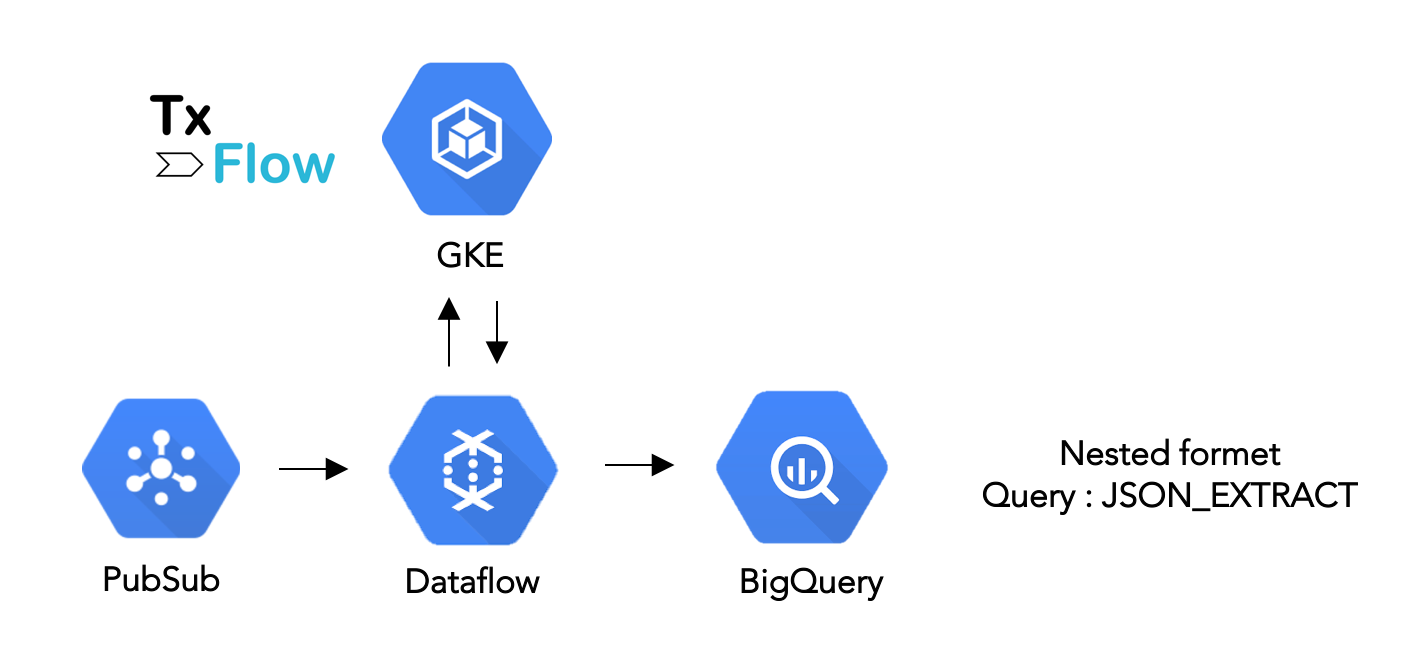
Create and execute a real-time pipeline tailored for exploratory analytics on SWIFT MT using Pub/Sub, Dataflow, TxFlow and BigQuery, and delivering data in a nested format, persisted as JSON strings.
At the end of this tutorial, a streaming data pipeline will be continuously writing data into BigQuery that is ready for downstream explorative analytics, for example by using the JSON functions available in Standard SQL.
Content
Section titled “Content”This tutorial shows how to ingest a real-time feed of SWIFT MT messages parsed, enriched and structured via TxFlow into BigQuery. It follows the steps:
- Read a real-time feed of SWIFT MT raw messages (string) from Pub/Sub
- Transform those messages to enriched JSON objects via a Dataflow job that sends requests to the TxFlow API and that uses the Python SDK of Apache Beam
- Ingest the JSON objects as JSON strings into BigQuery
- Show some examples of queries using JSON functions and JSONPath user defined function (UDF) within BigQuery
Motivation
Section titled “Motivation”Transactional data like SWIFT MT and ISO 20022 are a promising candidates to deliver new insights about business processes, the entities involved and the content of their transactions, hence enabling cost savings potential and new insights for banks. Being a string-based format with a quite complex syntax and structure, SWIFT MT represents challenges for the persistence and processing systems that deal with analytics use cases. In addition, SWIFT messages enter and exit the bank as a real-time flow which asks for dedicated platforms.
Toolkit
Section titled “Toolkit”Pub/Sub is a flexible, reliable, real-time messaging service for independent applications to publish and subscribe to asynchronous events.
Dataflow is a fully managed streaming analytics service that minimizes latency, processing time, and cost through autoscaling and batch processing.
TxFlow is our API that transforms, enriches, and structures SWIFT MT messages. It runs as a scalable application on the managed service Google Kubernetes Engine and can be deployed directly from the GCP marketplace or on-premises.
BigQuery is the serverless data warehouse that enables scalable analysis over petabytes of data, including built-in machine learning capabilities 1.
Apache Beam is an open source unified programming model to define and execute data processing pipelines, including extract-transform-load (ETL), batch and stream (continuous) processing. Beam Pipelines are defined using one of the provided SDKs (Java, Python, Go) and are executed in one of the Beam’s supported runners (distributed processing back-ends) including Apache Flink, Apache Samza, Apache Spark, and Dataflow 2.
Pre-requisites
Section titled “Pre-requisites”Pipeline creation
Section titled “Pipeline creation”Let us go through the different components.
GCP credentials and project
Section titled “GCP credentials and project”The following global variables are the only ones you need to edit in any case, since you are required to have a billable project and a key to access this project. Please refer to the above links for more details on how to create those.
PROJECT="my-swiftflow-pipeline"GOOGLE_APPLICATION_CREDENTIALS="path_to_key/swiftflow-pipeline-poc.json"TxFlow configs
Section titled “TxFlow configs”The users who do not want to use TxFlow can proceed further by setting SWIFTFLOW_EXECUTION="disabled". Once TxFlow is provisioned, it is required to expose an internal (or even an external) endpoint, or to forward the port to your localhost, as per those steps. Once done, you must report the URL to the SWIFTFLOW_ENDPOINT variable below. You can activate the functional endpoint nested (returning effectively a transformed value) or proceed first with the test endpoint (returning always the same value) in case you want to make sure the service is up and running: those endpoints are documented here.
SWIFTFLOW_EXECUTION = "disabled" # Or "nested" or "test"SWIFTFLOW_ENDPOINT = "http://<IP exposed by Swiftflow>:9000"Runner
Section titled “Runner”The next variable defines the runner that will execute your Beam pipeline. On one hand, the DirectRunner is used for development and goes with local execution, interactive logging and without code parallelization. On the other hand, the DataflowRunner is used for production and goes with remote execution on GCP workers, remote logging and code parallelization (with autoscaling enabled by default). In this latter case, some additional time is required to create the cluster of virtual machines (VMs) before the defined job can effectively start executing.
RUNNER="DataflowRunner" # Or "DirectRunner"GCP configs
Section titled “GCP configs”All the following variables can be used as-is or be changed by the user. They define the different artifacts used in the pipeline. While not actively used in this tutorial, we keep the REQUIREMENTS_FILE to show additional PyPI packages can be deployed to the worker nodes of Dataflow.
REGION="europe-west6" # Zurich data center, but chose yoursBUCKET=f"tutorial_swiftflow_{random.getrandbits(128)}"DATASET="tutorial"TABLE="mt_nested"COLUMN_NAME="msg"
TOPIC="tutorial_swiftflow_topic"SUBSCRIPTION="tutorial_swiftflow_subscription"OUTPUT_TOPIC=f"projects/{PROJECT}/topics/{TOPIC}"
TEMP_LOCATION="gs://"+BUCKET+"/temp"STAGING_LOCATION="gs://"+BUCKET+"/staging"
REQUIREMENTS_FILE="./requirements.txt"
Sample SWIFT MT messages
Section titled “Sample SWIFT MT messages”Two samples are given in the below. A MT910 message used in the Payments context (Confirmation of Payment) and a MT541 (Receive against Payment) used in Securities post trade3.
MT_910 = "{1:F01MASKCHZZX80A2596106739}{2:O9101900160703MASKCHZHXXXX25961067391607031900N}{3:{108:110110149709}}{4:\r\n:20:ALPINAREF-1\r\n:21:SOMEREF\r\n:25P:1234567890\r\nCRESCHZZ80A\r\n:13D:1712010800-0500\r\n:32A:180919CHF1000000000,00\r\n:50K:/CH3604835011405382000 \r\nSchweizerische-  und \r\nFernsehgesellschaft \r\nGiacomettistrasse 1 \r\nCH/3006 Zurich\r\n:52A:COPRATWW\r\n:56D:BANK OF JAMES \r\nTOKYO STREET  \r\n Manilla \r\nPhilippines\r\n:72:CVR OF DIR PYMT \r\nSSN:123456 \r\n-}"
MT_541 = "{1:F01ABNACHZ8XXXX2596106739}{2:O5411345160418ICBKCNBJXBJM00897254971604181345N}{3:{108:110110149709}}{4:\r\n:16R:GENL\r\n:20C::SEME//1234567890123456\r\n:23G:NEWM\r\n:98C::PREP//20181123165256\r\n:16S:GENL\r\n:16R:TRADDET\r\n:98A::TRAD//20181123\r\n:98A::SETT//20181127\r\n:35B:ISIN CH0012138530\r\nCREDIT SUISSE GROUP\r\n:16S:TRADDET\r\n:16R:FIAC\r\n:36B::SETT//UNIT/10,\r\n:97A::SAFE//0123-1234567-05-001\r\n:94F::SAFE//NCSD/INSECHZZXXX\r\n:16S:FIAC\r\n:16R:SETDET\r\n:22F::SETR//TRAD\r\n:16R:SETPRTY\r\n:95R::DEAG/SCOM/CH123456\r\n:16S:SETPRTY\r\n:16R:SETPRTY\r\n:95P::SELL//ABCDABABXXX\r\n:97A::SAFE//123456789\r\n:16S:SETPRTY\r\n:16R:SETPRTY\r\n:95P::PSET//INSECHZZ\r\n:16S:SETPRTY\r\n:16R:AMT\r\n:19A::SETT//CHF218,4\r\n:16S:AMT\r\n:16S:SETDET\r\n-}"
Schema
Section titled “Schema”Since we are ingesting JSON strings, the schema for BigQuery is simple.
SCHEMA = {'fields': [{'name': COLUMN_NAME, 'type': 'STRING', 'mode': 'NULLABLE'}]}Authentication
Section titled “Authentication”One simply passes the credentials defined earlier to the Python environment.
os.environ["GOOGLE_APPLICATION_CREDENTIALS"] = GOOGLE_APPLICATION_CREDENTIALSGCP utils
Section titled “GCP utils”The following methods will be used only once to create all required artifacts and allow to execute the pipeline later on.
# GCS utils
def create_bucket():
    bucket_name = BUCKET    storage_client = storage.Client()    bucket = storage_client.bucket(bucket_name)    new_bucket = storage_client.create_bucket(bucket, location=REGION)
    print("Created bucket {} in {}".format(new_bucket.name, new_bucket.location))
# PubSub utils
def create_topic():
    publisher = pubsub_v1.PublisherClient()    topic_name = f"projects/{PROJECT}/topics/{TOPIC}"    publisher.create_topic(topic_name)
def create_subscriber():
    publisher = pubsub_v1.PublisherClient()    subscriber = pubsub_v1.SubscriberClient()    topic_path = publisher.topic_path(PROJECT, TOPIC)    sub_path = subscriber.subscription_path(PROJECT, SUBSCRIPTION)    subscriber.create_subscription(name=sub_path,topic=topic_path)
def publish(msg=MT_541.encode()):
    publisher = pubsub_v1.PublisherClient()    topic_path = publisher.topic_path(PROJECT, TOPIC)    publisher.publish(topic_path,msg,spam='eggs')
# BigQuery utils
def create_dataset():
    dataset_id = f"{PROJECT}.{DATASET}"    client = bigquery.Client()    dataset = bigquery.Dataset(dataset_id)    dataset.location = REGION    dataset = client.create_dataset(dataset, timeout=30)  # Make an API request.    print("Created dataset {}.{}".format(client.project, dataset.dataset_id))
TxFlow utils
Section titled “TxFlow utils”There is only one processing step. It is defined as a custom class MtToJson that inherits from a DoFn class, which represents a Beam SDK class that defines a distributed processing function4. It contains the logic necessary to the request to the TxFlow endpoint and formatting. The other class XyzOptions in the below is a wrapper used to pass custom arguments to our pipeline.
class MtToJson(beam.DoFn):
    def __init__(self, pipeline_options):
        self.execution = pipeline_options.swiftflow_execution        self.endpoint = pipeline_options.swiftflow_endpoint        self.column_name = pipeline_options.column_name
    def process(self, mtMessage):
        import requests as rq # Required to avoid variable conflicts on Dataflow VM
        # Real request        if self.execution == "nested":
            url = self.endpoint+"/nested"            response_str = rq.post(url,json.dumps({"data":mtMessage}))            response_dict = json.loads(response_str.content)            payload_str = response_dict['data']
        # Test request        elif self.execution == "test":
            url = self.endpoint+"/example"            response_str =  rq.post(url,json.dumps({"data":"testing"}))            response_dict = json.loads(response_str.content)            payload_str = response_dict['data']
        # Swiftflow not available, falls back to dummy JSON        else:
            payload_str = '{"a":["a1","a2"],"b":["b1","b2","b3"]}'
        # Return
        yield {self.column_name:payload_str}
class XyzOptions(PipelineOptions):
        @classmethod        def _add_argparse_args(cls, parser):            parser.add_argument('--swiftflow_execution', default='nested')            parser.add_argument('--swiftflow_endpoint', default='none'),            parser.add_argument('--column_name', default='msg')
Pipeline
Section titled “Pipeline”Finally, the run() method contains the options passed to the pipeline, and the pipeline workflow definition itself.
def run():
  # Pipeline options
    pipeline_options = None
    if RUNNER == "DirectRunner" :
        pipeline_options = XyzOptions(                            save_main_session=True, streaming=True,                            swiftflow_execution=SWIFTFLOW_EXECUTION,                            swiftflow_endpoint=SWIFTFLOW_ENDPOINT,                            column_name=COLUMN_NAME)
    elif RUNNER == "DataflowRunner" :
        pipeline_options = XyzOptions(                            save_main_session=True, streaming=True,                            runner='DataflowRunner',                            project=PROJECT,                            region=REGION,                            temp_location=TEMP_LOCATION,                            staging_location=STAGING_LOCATION,                            requirements_file=REQUIREMENTS_FILE,                            swiftflow_execution=SWIFTFLOW_EXECUTION,                            swiftflow_endpoint=SWIFTFLOW_ENDPOINT,                            column_name=COLUMN_NAME)
    # Pipeline workflow
    with beam.Pipeline(options=pipeline_options) as p:
      input_subscription=f"projects/{PROJECT}/subscriptions/{SUBSCRIPTION}"      output_table=f"{PROJECT}:{DATASET}.{TABLE}"
      _ = (
          p          | 'Read from Pub/Sub' >> beam.io.ReadFromPubSub(                    subscription=input_subscription).with_output_types(bytes)          | 'Conversion UTF-8 bytes to string' >> beam.Map(lambda msg: msg.decode('utf-8'))          | "Transformation MT to JSON" >> beam.ParDo(MtToJson(pipeline_options))          | 'Write to BigQuery' >> beam.io.WriteToBigQuery(                    output_table,                    schema = SCHEMA,                    custom_gcs_temp_location=BUCKET,                    create_disposition=beam.io.BigQueryDisposition.CREATE_IF_NEEDED,                    write_disposition=beam.io.BigQueryDisposition.WRITE_APPEND)
          )
Putting all together
Section titled “Putting all together”The following snippet contains the entire code we need for the execution.
# Packages
from __future__ import absolute_import
import osimport apache_beam as beamfrom apache_beam.options.pipeline_options import PipelineOptionsfrom google.cloud import pubsub_v1import jsonfrom google.cloud import bigqueryfrom google.cloud import storageimport random
import logginglogging.getLogger().setLevel(logging.INFO)
# GCP credentials and project
PROJECT="my-swiftflow-pipeline"GOOGLE_APPLICATION_CREDENTIALS="path_to_key/swiftflow-pipeline-poc.json"
# Swiftflow configs
SWIFTFLOW_EXECUTION = "disabled" # Or "nested" or "test"SWIFTFLOW_ENDPOINT = "http://<IP exposed by Swiftflow>:9000"
# Runner
RUNNER="DataflowRunner" # Or "DirectRunner"
# GCP configs
REGION="europe-west6" # Zurich data center, but chose yoursBUCKET=f"tutorial_swiftflow_{random.getrandbits(128)}"DATASET="tutorial"TABLE="mt_nested"COLUMN_NAME="msg"
TOPIC="tutorial_swiftflow_topic"SUBSCRIPTION="tutorial_swiftflow_subscription"OUTPUT_TOPIC=f"projects/{PROJECT}/topics/{TOPIC}"
TEMP_LOCATION="gs://"+BUCKET+"/temp"STAGING_LOCATION="gs://"+BUCKET+"/staging"
REQUIREMENTS_FILE="./requirements.txt"
# Sample messages
MT_910 = "{1:F01MASKCHZZX80A2596106739}{2:O9101900160703MASKCHZHXXXX25961067391607031900N}{3:{108:110110149709}}{4:\r\n:20:ALPINAREF-1\r\n:21:SOMEREF\r\n:25P:1234567890\r\nCRESCHZZ80A\r\n:13D:1712010800-0500\r\n:32A:180919CHF1000000000,00\r\n:50K:/CH3604835011405382000 \r\nSchweizerische-  und \r\nFernsehgesellschaft \r\nGiacomettistrasse 1 \r\nCH/3006 Zurich\r\n:52A:COPRATWW\r\n:56D:BANK OF JAMES \r\nTOKYO STREET  \r\n Manilla \r\nPhilippines\r\n:72:CVR OF DIR PYMT \r\nSSN:123456 \r\n-}"
MT_541 = "{1:F01ABNACHZ8XXXX2596106739}{2:O5411345160418ICBKCNBJXBJM00897254971604181345N}{3:{108:110110149709}}{4:\r\n:16R:GENL\r\n:20C::SEME//1234567890123456\r\n:23G:NEWM\r\n:98C::PREP//20181123165256\r\n:16S:GENL\r\n:16R:TRADDET\r\n:98A::TRAD//20181123\r\n:98A::SETT//20181127\r\n:35B:ISIN CH0012138530\r\nCREDIT SUISSE GROUP\r\n:16S:TRADDET\r\n:16R:FIAC\r\n:36B::SETT//UNIT/10,\r\n:97A::SAFE//0123-1234567-05-001\r\n:94F::SAFE//NCSD/INSECHZZXXX\r\n:16S:FIAC\r\n:16R:SETDET\r\n:22F::SETR//TRAD\r\n:16R:SETPRTY\r\n:95R::DEAG/SCOM/CH123456\r\n:16S:SETPRTY\r\n:16R:SETPRTY\r\n:95P::SELL//ABCDABABXXX\r\n:97A::SAFE//123456789\r\n:16S:SETPRTY\r\n:16R:SETPRTY\r\n:95P::PSET//INSECHZZ\r\n:16S:SETPRTY\r\n:16R:AMT\r\n:19A::SETT//CHF218,4\r\n:16S:AMT\r\n:16S:SETDET\r\n-}"
# Schema: single string column
SCHEMA = {'fields': [{'name': COLUMN_NAME, 'type': 'STRING', 'mode': 'NULLABLE'}]}
# Authentication
os.environ["GOOGLE_APPLICATION_CREDENTIALS"] = GOOGLE_APPLICATION_CREDENTIALS
# GCS utils
def create_bucket():
    bucket_name = BUCKET    storage_client = storage.Client()    bucket = storage_client.bucket(bucket_name)    new_bucket = storage_client.create_bucket(bucket, location=REGION)
    print("Created bucket {} in {}".format(new_bucket.name, new_bucket.location))
# PubSub utils
def create_topic():
    publisher = pubsub_v1.PublisherClient()    topic_name = f"projects/{PROJECT}/topics/{TOPIC}"    publisher.create_topic(topic_name)
def create_subscriber():
    publisher = pubsub_v1.PublisherClient()    subscriber = pubsub_v1.SubscriberClient()    topic_path = publisher.topic_path(PROJECT, TOPIC)    sub_path = subscriber.subscription_path(PROJECT, SUBSCRIPTION)    subscriber.create_subscription(name=sub_path,topic=topic_path)
def publish(msg=MT_541.encode()):
    publisher = pubsub_v1.PublisherClient()    topic_path = publisher.topic_path(PROJECT, TOPIC)    publisher.publish(topic_path,msg,spam='eggs')
# BigQuery utils
def create_dataset():
    dataset_id = f"{PROJECT}.{DATASET}"    client = bigquery.Client()    dataset = bigquery.Dataset(dataset_id)    dataset.location = REGION    dataset = client.create_dataset(dataset, timeout=30)  # Make an API request.    print("Created dataset {}.{}".format(client.project, dataset.dataset_id))
# Swiftflow utils
class MtToJson(beam.DoFn):
    def __init__(self, pipeline_options):
        self.execution = pipeline_options.swiftflow_execution        self.endpoint = pipeline_options.swiftflow_endpoint        self.column_name = pipeline_options.column_name
    def process(self, mtMessage):
        import requests as rq # Required to avoid variable conflicts on Dataflow VM
        # Real request        if self.execution == "nested":
            url = self.endpoint+"/nested"            response_str = rq.post(url,json.dumps({"data":mtMessage}))            response_dict = json.loads(response_str.content)            payload_str = response_dict['data']
        # Test request        elif self.execution == "test":
            url = self.endpoint+"/example"            response_str =  rq.post(url,json.dumps({"data":"testing"}))            response_dict = json.loads(response_str.content)            payload_str = response_dict['data']
        # Swiftflow not available, falls back to dummy JSON        else:
            payload_str = '{"a":["a1","a2"],"b":["b1","b2","b3"]}'
        # Return
        yield {self.column_name:payload_str}
class XyzOptions(PipelineOptions):
        @classmethod        def _add_argparse_args(cls, parser):            parser.add_argument('--swiftflow_execution', default='nested')            parser.add_argument('--swiftflow_endpoint', default='none'),            parser.add_argument('--column_name', default='msg')
# Run
def run():
  # Pipeline options
    pipeline_options = None
    if RUNNER == "DirectRunner" :
        pipeline_options = XyzOptions(                            save_main_session=True, streaming=True,                            swiftflow_execution=SWIFTFLOW_EXECUTION,                            swiftflow_endpoint=SWIFTFLOW_ENDPOINT,                            column_name=COLUMN_NAME)
    elif RUNNER == "DataflowRunner" :
        pipeline_options = XyzOptions(                            save_main_session=True, streaming=True,                            runner='DataflowRunner',                            project=PROJECT,                            region=REGION,                            temp_location=TEMP_LOCATION,                            staging_location=STAGING_LOCATION,                            requirements_file=REQUIREMENTS_FILE,                            swiftflow_execution=SWIFTFLOW_EXECUTION,                            swiftflow_endpoint=SWIFTFLOW_ENDPOINT,                            column_name=COLUMN_NAME)
    # Pipeline workflow
    with beam.Pipeline(options=pipeline_options) as p:
      input_subscription=f"projects/{PROJECT}/subscriptions/{SUBSCRIPTION}"      output_table=f"{PROJECT}:{DATASET}.{TABLE}"
      _ = (
          p          | 'Read from Pub/Sub' >> beam.io.ReadFromPubSub(                    subscription=input_subscription).with_output_types(bytes)          | 'Conversion UTF-8 bytes to string' >> beam.Map(lambda msg: msg.decode('utf-8'))          | "Transformation MT to JSON" >> beam.ParDo(MtToJson(pipeline_options))          | 'Write to BigQuery' >> beam.io.WriteToBigQuery(                    output_table,                    schema = SCHEMA,                    custom_gcs_temp_location=BUCKET,                    create_disposition=beam.io.BigQueryDisposition.CREATE_IF_NEEDED,                    write_disposition=beam.io.BigQueryDisposition.WRITE_APPEND)
          )
Pipeline execution
Section titled “Pipeline execution”1. Create artifacts
Section titled “1. Create artifacts”Simply execute the following commands in a Python console.
create_bucket()create_topic()create_subscriber()2. Build and run the pipeline
Section titled “2. Build and run the pipeline”Once the above commands are completed, type the following.
run()If you are executing your code with the DataflowRunner you can monitor the process on the GCP using the Dataflow console. Note that is might take several minutes until the pipeline is ready to stream data.
3. Publish a message
Section titled “3. Publish a message”Execute the following code in a new Python console. You can use the default value or pass another value. Note that a UTF-8 byte string is expected by PubSub, so use the conversions b"message" or msg.encode().
publish() # In a new Python console
# Or publish(msg=MT_910.encode())
At this point, the execution of Dataflow will automatically be triggered: the raw message be we read from Pub/Sub, a table will be created in BigQuery if not yet existing, and the message received from TxFlow will be ingested in this table. Let us briefly explore the results.
Analytics
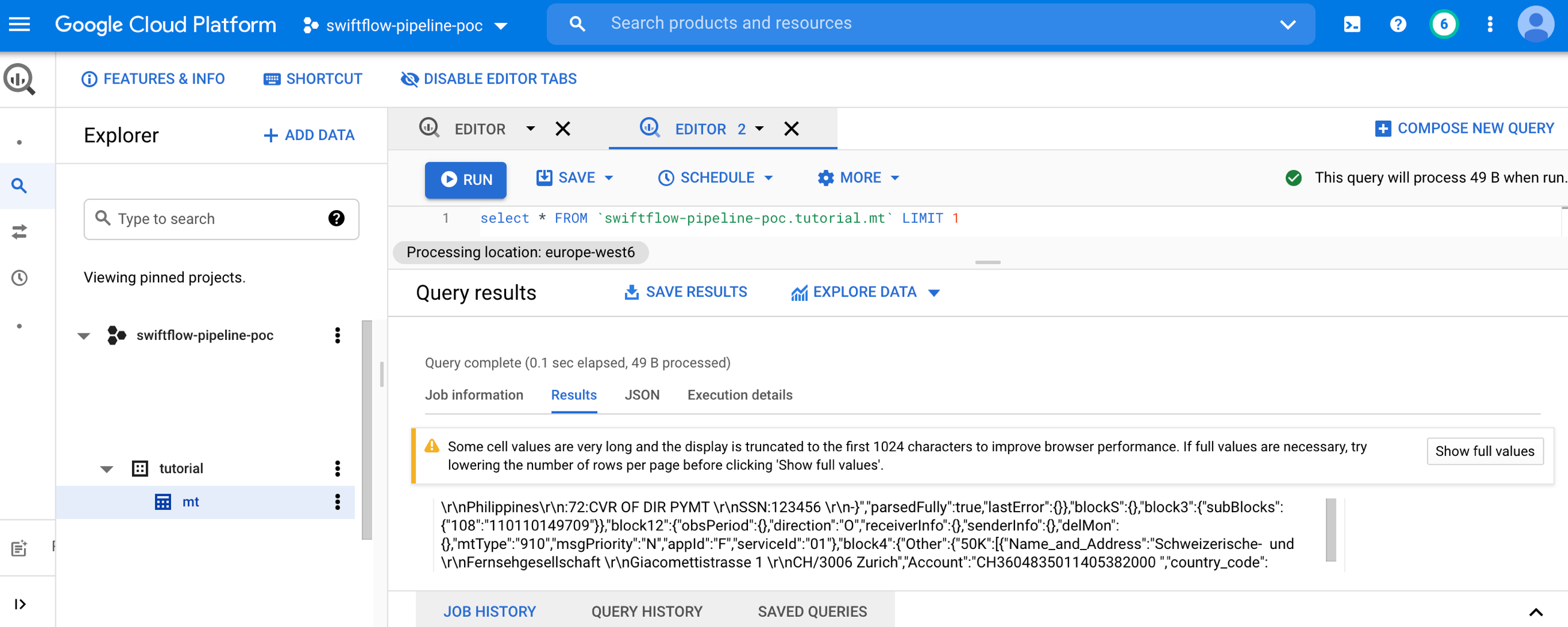
Section titled “Analytics”You can use the BigQuery console to explore data, its schema, and run queries, from a similar view as the one below. Note that the stream job defined previously will keep streaming data into BigQuery even when you are querying.
Payments - MT910
Section titled “Payments - MT910”This is the raw message as it is received from the SWIFT network.
MT_910 = "{1:F01MASKCHZZX80A2596106739}{2:O9101900160703MASKCHZHXXXX25961067391607031900N}{3:{108:110110149709}}{4:\r\n:20:ALPINAREF-1\r\n:21:SOMEREF\r\n:25P:1234567890\r\nCRESCHZZ80A\r\n:13D:1712010800-0500\r\n:32A:180919CHF1000000000,00\r\n:50K:/CH3604835011405382000 \r\nSchweizerische- und \r\nFernsehgesellschaft \r\nGiacomettistrasse 1 \r\nCH/3006 Zurich\r\n:52A:COPRATWW\r\n:56D:BANK OF JAMES \r\nTOKYO STREET \r\n Manilla \r\nPhilippines\r\n:72:CVR OF DIR PYMT \r\nSSN:123456 \r\n-}"BigQuery/JSON
Section titled “BigQuery/JSON”The below view shows the message transformed by TxFlow and stored as a JSON string in one single column.
BigQuery/Extract
Section titled “BigQuery/Extract”BigQuery supports many JSON functions in Standard SQL. In the following query, we extract the name/address fields and country codes of the Ordering Customer and the Intermediary Party involved in the transaction with the geolocalization feature of TxFlow. Observe that the full paths of the fields are required to access the field values of interest.
SELECTJSON_EXTRACT(msg,'$.block4.Other.50K[0].Name_and_Address') AS customer_name_address,JSON_EXTRACT(msg,'$.block4.Other.50K[0].country_code[0]') AS customer_country_code,JSON_EXTRACT(msg,'$.block4.Other.56D[0].Name_and_Address') AS intemediary_name_address,JSON_EXTRACT(msg,'$.block4.Other.56D[0].country_code[0]') AS intemediary_country_codeFROM `swiftflow-pipeline-poc.tutorial.mt`
BigQuery offers the possibility to define and run user defined functions (UDF), as a way to extend the built-in capabilities. In the following example, the JSONPath is added as a third-party JavaScript UDF. A key feature of JSONPath is that is allows for using the recursive operator .., hence enabling to query fields using only a partial path, for example using only tags or business names and without knowing the full context of inside the message. Even better, it is also possible to define some patterns for the search. In the below example, one retrieves all attributes related to the Intermediary by using only the tag 50 and without knowing anything else about the field location.
CREATE TEMPORARY FUNCTION CUSTOM_JSON_EXTRACT(json_path STRING,json STRING)RETURNS STRINGLANGUAGE js AS """  return JSONPath(json_path,JSON.parse(json));"""OPTIONS (  library="gs://tutorial_swiftflow/jsonpath_plus_eval.js");
SELECT CUSTOM_JSON_EXTRACT('$..[?(@path.includes("[\'50"))]',msg) AS intemediary_attributesFROM `swiftflow-pipeline-poc.tutorial.mt_nested`
This leads to following output.

Securities - MT541
Section titled “Securities - MT541”Let us document again the raw message as it is received from the SWIFT network.
MT_541 = "{1:F01ABNACHZ8XXXX2596106739}{2:O5411345160418ICBKCNBJXBJM00897254971604181345N}{3:{108:110110149709}}{4:\r\n:16R:GENL\r\n:20C::SEME//1234567890123456\r\n:23G:NEWM\r\n:98C::PREP//20181123165256\r\n:16S:GENL\r\n:16R:TRADDET\r\n:98A::TRAD//20181123\r\n:98A::SETT//20181127\r\n:35B:ISIN CH0012138530\r\nCREDIT SUISSE GROUP\r\n:16S:TRADDET\r\n:16R:FIAC\r\n:36B::SETT//UNIT/10,\r\n:97A::SAFE//0123-1234567-05-001\r\n:94F::SAFE//NCSD/INSECHZZXXX\r\n:16S:FIAC\r\n:16R:SETDET\r\n:22F::SETR//TRAD\r\n:16R:SETPRTY\r\n:95R::DEAG/SCOM/CH123456\r\n:16S:SETPRTY\r\n:16R:SETPRTY\r\n:95P::SELL//ABCDABABXXX\r\n:97A::SAFE//123456789\r\n:16S:SETPRTY\r\n:16R:SETPRTY\r\n:95P::PSET//INSECHZZ\r\n:16S:SETPRTY\r\n:16R:AMT\r\n:19A::SETT//CHF218,4\r\n:16S:AMT\r\n:16S:SETDET\r\n-}"BigQuery/JSON
Section titled “BigQuery/JSON”The below view shows the message ingested in the table.

BigQuery/Extract
Section titled “BigQuery/Extract”Securities messages (e.g MT5XX) are generally much longer and deeper (more nesting levels) than payment messages (MT1XX, MT2XX, MT910, …). It is therefore critical for fast and granular exploration to be able to query all specific fields without knowing the exact path of the field within the message (e.g. under which tag or which section it is located), as already evidenced. In the following we extract the Place of Settlement of the trade and with only some partial knowledge of the paths.
CREATE TEMPORARY FUNCTION CUSTOM_JSON_EXTRACT(json STRING,json_path STRING)RETURNS STRINGLANGUAGE js AS """  return jsonPath(JSON.parse(json),json_path);"""OPTIONS (  library="gs://tutorial_swiftflow/jsonpath-0.8.0.js");
SELECTCUSTOM_JSON_EXTRACT(msg,'$..PSET..Identifier_Code_Bank_Code') AS pset_bank_code,CUSTOM_JSON_EXTRACT(msg,'$..PSET..Identifier_Code_Country_Code') AS pset_country_code,CUSTOM_JSON_EXTRACT(msg,'$..PSET..Identifier_Code_Location_Code') AS pset_location_codeFROM `swiftflow-pipeline-poc.tutorial.mt`

Next steps
Section titled “Next steps”Once dedicated views are created on the data and using the proposed syntax, following steps are possible:
- Direct analysis within BigQuery
- Downstream programmatic analytics (e.g. conversion to pandas package using the Python client)
- File export as (button “Save results”)
- Business intelligence (BI) and dashboarding via Data Studio (button “Explore data”). Note that Data Studio is a free tool.

Another possible next step is to use BigQuery Machine Learning (ML) which lets you create and execute machine learning models using standard SQL queries. Have a look on the various tutorials available.
Limitations
Section titled “Limitations”While the proposed approach allows you to create your own views with some partial knowledge of the exact field addresses, it comes with a few limitations:
- It requires the user to have a quite clear idea on the attributes to be extracted
- When the requirements go beyond a few tenths of attributes, the queries get very long and difficult to design, execute, resonate about, and maintain
- Unless you persist views, every new query execution will have to start by extracting the required field from the JSON string object, which might induce some performance losses and unnecessary costs
- Finally and most importantly for machine learning applications, you do no get a holistic view of the raw data. Since every field has to be known in advance, the user can never be user that he managed to extract all possible fields, which is by the way not possible to do by hand.
An alternative is presented in the following tutorial: Switflow pipeline / Part 2 – Dataflow To BigQuery (tabular format).
Footnotes
Section titled “Footnotes”Copyright © 2026 Alpina Analytics GmbH, Switzerland. All rights reserved.